

If the door opens from the wall button but ignores the remote, the opener’s motor and the door are almost always fine. The problem sits in the wireless link: a weak battery, the wall panel’s lock setting, a remote that lost its programming, interference near the opener, or, less often, the receiver inside the opener. You can check the first four in about 15 minutes with a stepladder and a fresh battery. If they don’t fix it, the receiver or a worn opener part is the likely cause, and that is a repair our technicians handle across Massachusetts and Connecticut.
TL;DR
- Start with the cheap fixes: a fresh remote battery, then the wall control’s Lock feature, then testing the remote a few feet from the opener.
- If the wall button works but the remote doesn’t, the two run on separate paths. The wall control is wired, and the remote talks wirelessly to a receiver in the opener.
- Reprogram the remote by pressing the opener’s Learn button, then the remote button. Erasing all codes first clears out a confused memory.
- Interference from bulbs, new electronics or radio sources can cut remote range to a few feet.
- If no remote will program, or every remote and keypad died at once, the opener’s receiver or logic board is the suspect. That is a job for a technician.
Table of Contents
- First, work out which kind of failure you have
- Step 1: Replace the remote battery
- Step 2: Check the wall control’s Lock feature
- Step 3: Test the remote up close, then reprogram it
- Step 4: Rule out interference and range problems
- Step 5: Check the car’s built-in button, if that’s your “remote”
- Step 6: When the receiver or logic board is the problem
- What if nothing works, wall button included?
- Why does it come and go?
- When to stop troubleshooting and call
- Get it fixed the same day
- FAQ
- Sources
First, work out which kind of failure you have
The fix depends on the pattern, so spend one minute watching what happens.
| What you see | Most likely cause | Go to |
|---|---|---|
| Remote works only when you stand next to the door | Weak battery or interference | Steps 1 and 4 |
| Opener light blinks twice when you press the remote | Lock feature is on | Step 2 |
| Wall button works, remote doesn’t | Battery, lock, or lost programming | Steps 1 to 3 |
| Remote works sometimes, not others | Battery, range, or outside interference | Steps 1 and 4 |
| Every remote and keypad stopped at once | Receiver or logic board | Step 6 |
| Nothing works, including the wall button | Power, safety sensors, or a mechanical problem | See the section below |
The wall control and the remote work independently. The wall control is hard-wired, while the remote sends a wireless signal to the opener’s receiver logic board. That is why a working wall button tells you something useful: the motor has power and can lift the door.
Step 1: Replace the remote battery
This is the most common cause, and the cheapest to rule out. A door manufacturer’s support page lists dead batteries as the most common reason a remote fails to operate the door, ahead of misaligned photo eyes and broken springs.
A battery doesn’t always fail all at once. As it weakens, the transmitter’s range shrinks. You notice the remote needs you to be in the driveway rather than at the end of the street, then in the garage doorway, then not at all. If your remote has become fussy about distance, treat the battery as the first suspect even if the small light on the remote still blinks.
Where this goes wrong:
- Wrong cell. Most remotes use a flat coin cell, often stamped with a number like 2032 or a 12-volt cell. Match the one printed on the old battery.
- Backwards polarity. Check the plus side before you close the case.
- Dirty contacts. If the new battery doesn’t help, look for corrosion or a bent contact inside the remote.
Don’t forget the remote clipped to your visor. Sun and heat in a parked car wear batteries down faster than a remote kept in a drawer.
Step 2: Check the wall control’s Lock feature
Many wall controls have a Lock button. When it is on, the opener ignores the remotes but still obeys the wall button. That produces exactly the symptom in your search: wall button works, remote doesn’t.
The tell is the opener’s light. According to the manufacturer’s support guidance, with the lock on, the wall control’s indicator light flashes and the opener light blinks twice when you press the remote. Many models turn the lock off by holding the Lock button for about two seconds, but check the label on your wall panel, since button layouts differ.
This is also a common reason a remote “suddenly” stops working. Someone leaning on the panel, a child pressing buttons, or a vacation setting someone forgot about can switch it on without anyone noticing.
Step 3: Test the remote up close, then reprogram it
Stand a few feet from the opener motor unit and press the remote. This single test splits the problem in two:
- Works up close, fails at distance: range problem. Go to Step 4.
- Fails even up close with a fresh battery: the remote has probably lost its link to the opener. Reprogram it.
Find the Learn button
The Learn button sits on the motor unit, usually near the antenna wire that hangs from it. If you can’t see it, remove the light cover or look at the side where the wall control and safety sensor wires connect. The button’s color varies by opener generation, and a yellow one marks a Security+ 2.0 opener on that brand’s models.
The basic programming sequence
The exact order depends on the brand, but the pattern is consistent. One manufacturer’s instruction sheet has you start with the door closed, press and release the Learn button, then within 30 seconds press and hold the remote button until the opener lights blink or you hear two clicks. Then test the button.
Two things trip people up:
- The 30-second window is real. Have the remote in your hand before you touch the Learn button, and use a stepladder you’ve already set up.
- Universal remotes need the right setting. The same instruction sheet lists press counts for older openers, for example 8 presses for yellow-button openers from 2011 on and 3 for purple-button models from 2005 on. Guessing the generation wastes a lot of time.
When to erase all codes
If you’ve lost a remote, bought a used home, or the opener behaves oddly with several remotes, clear the memory. On one common model, you press and hold the Learn button until its indicator light goes out, about 6 seconds, which erases every remote and keypad. Then reprogram each one you still use. Erasing is also the right security step after a stolen remote or car break-in.
After an erase, nothing opens the door wirelessly until you reprogram, so do it when you have time and every remote in hand.
Step 4: Rule out interference and range problems
If the remote works near the opener but dies at 15 feet, something is drowning out the signal or weakening it. One manufacturer notes that a remote with less than 25 feet of range can often be fixed by a new battery, removing competing radio signals, checking for recently added items near the garage, and removing energy-efficient bulbs that can interfere.
Work through the likely culprits:
- The bulbs in the opener. Some energy-efficient bulbs generate radio noise. The trade association’s troubleshooting guide says you can test this by removing or turning off the bulbs and trying the remote again.
- Anything new. A new Wi-Fi extender, security system, baby monitor, or charger in or near the garage is worth unplugging as a test.
- The antenna. The thin wire hanging from the motor unit is the receiving antenna. Keep it hanging straight down, not tucked behind the housing or coiled against metal.
- Where you press. Metal garage walls, tinted car windows, and parking with the remote inside a bag all cut range.
There is also a less obvious source. The same guide says that up to 40 million U.S. homeowners with door or gate operators could be affected by interference from the military’s Land Mobile Radio system, which began operating at military installations in 2004. For stubborn cases involving that or other radio sources, it points to a frequency retrofit through the manufacturer or dealer, and says a whole new opener is probably unnecessary. If you live near a military site and your remotes have always been unreliable, that is worth keeping in mind.
Step 5: Check the car’s built-in button, if that’s your “remote”
Many drivers use the buttons built into the car rather than a handheld remote. When those stop working, the garage often isn’t the problem, because the car stores its own link.
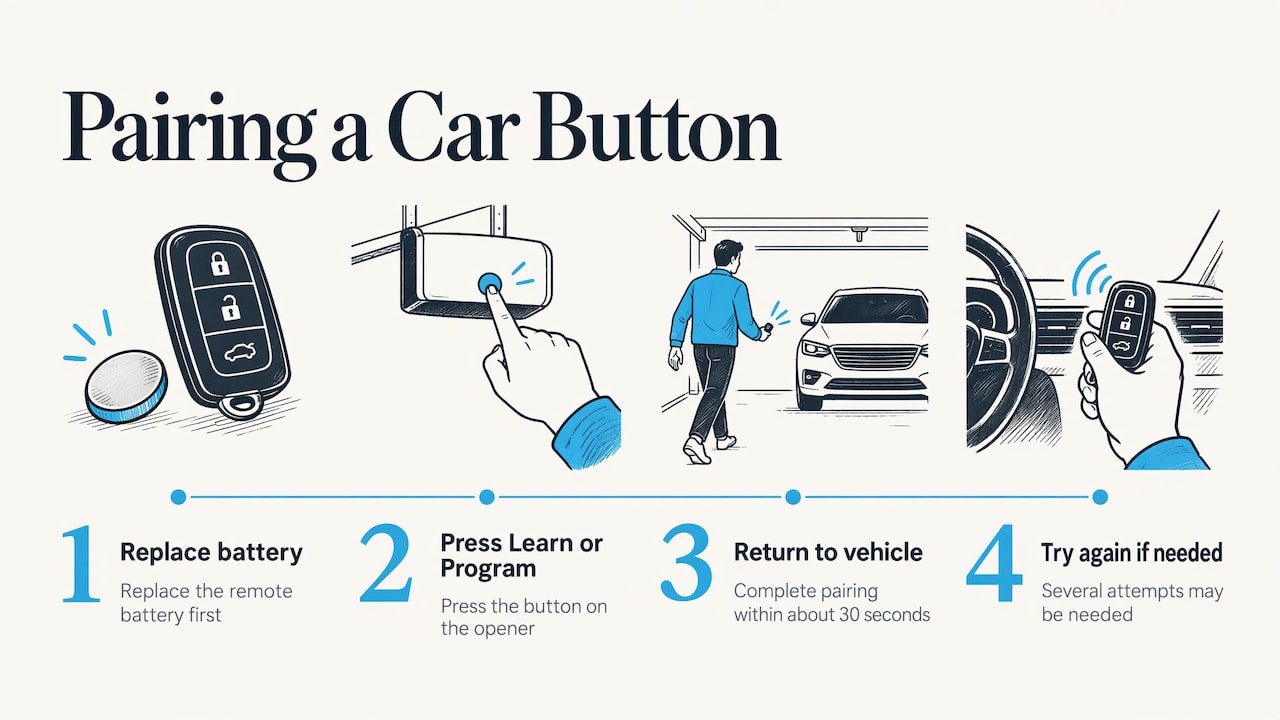
The pairing is time-sensitive. One automaker’s manual has you replace the remote’s battery first, then press the Learn or Program button on the opener and return to the vehicle within about 30 seconds to complete the step. It also notes you may need several attempts. This is easier with a second person standing at the car while you work the ladder.
One caution if you’re considering a smart-app setup: the same automaker’s guide says that the opener must be compatible, the garage needs a strong Wi-Fi signal, and the app requires a paid subscription. It also says the system should not be used with a door lacking safety stop and reverse features.
Step 6: When the receiver or logic board is the problem
Suppose you’ve replaced the battery, switched off the lock, erased the codes, and still no remote will program. Or every remote and keypad stopped at the same moment. In that case the receiver, which is part of the opener’s logic board, is the likely failure. Manufacturer guidance says that when all remotes and wireless devices stop at the same time, the circuit board may need replacing. Craftsman’s support page also lists a short in the wall control, its wire, or the logic board as a cause.
A power surge or lightning storm is a common trigger. Resetting the board by unplugging the opener for a minute is a safe thing to try. Beyond that, opening the opener housing is a technician’s job, because it sits next to live wiring and the motor that moves a heavy door.
This is where our work picks up. Our opener repair and installation service covers keypads and remotes, receiver service, sensor replacement and gear replacement. If you’d rather start with the remote itself, our guide to choosing, programming and fixing a garage remote walks through the options.
What if nothing works, wall button included?
Then the cause is no longer the remote. Check these in order:
- Power. Confirm the opener is plugged in and the outlet works. A tripped GFCI outlet elsewhere on the circuit is a common culprit.
- Safety sensors. The small photo eyes near the floor must be aligned and clean. A misaligned eye is one of the causes the door manufacturer lists for an opener that won’t respond. If the door closes but not opens, or the opener light blinks without moving the door, start here. Our guide on why a garage door won’t close covers the sensor checks in detail.
- A broken spring. If the motor hums or strains but the door barely lifts, or you heard a loud bang from the garage, a spring has likely broken. Stop using the opener. Our list of warning signs a spring is about to break shows how to spot trouble early.
Opening the door by hand
If you must get a car out, the opener has a manual release, usually a red cord hanging from the trolley on the rail. Use it only with the door fully closed. Pulling the release with the door raised can let it drop. Lift slowly from the bottom center, and have a second person help with heavy or insulated doors.
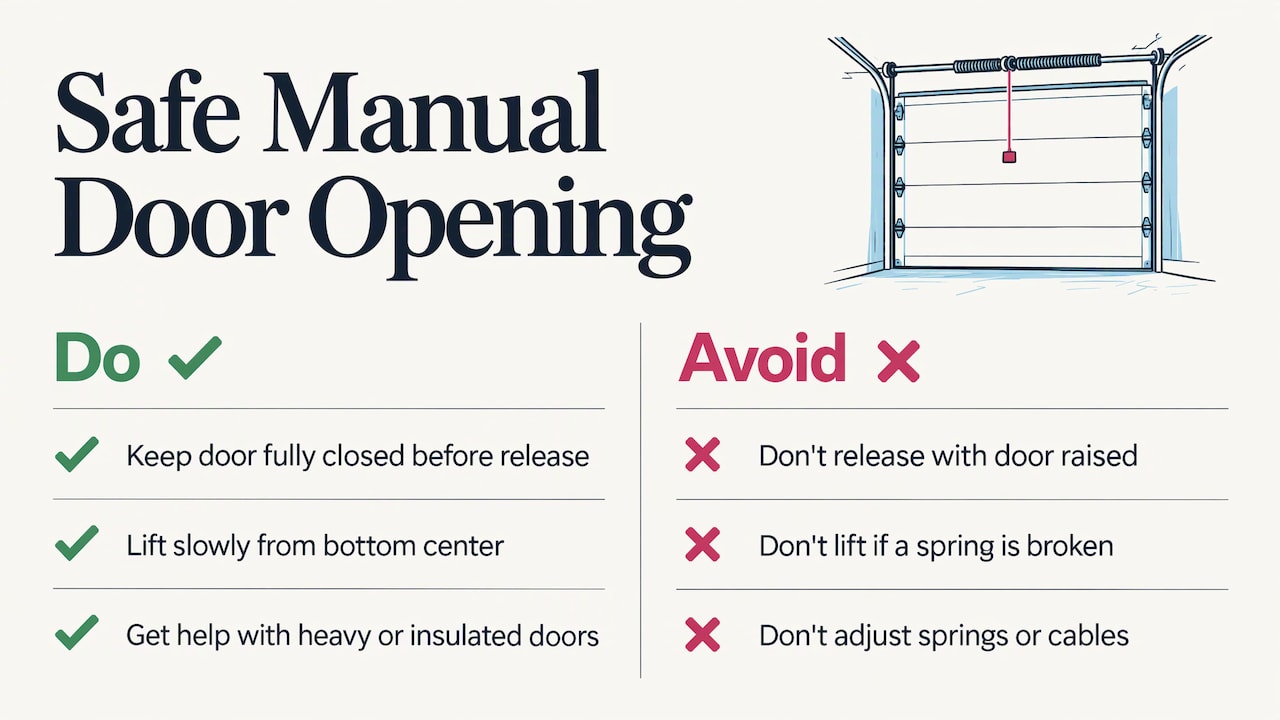
If you suspect a broken spring, do not lift the door by hand. Spring tension is what balances the door’s weight, and a broken spring leaves a heavy door that can fall or injure you. Springs and cables are under high tension, so don’t loosen or adjust them yourself. Our spring repair team handles that, and we offer 24/7 emergency service if you can’t leave your garage.
Why does it come and go?
A remote that works intermittently is more frustrating than one that has died, because it suggests a fix that never sticks. The patterns are usually these:
- A battery on its way out. It works on warm afternoons, fails on cold mornings. Cold lowers a battery’s output.
- Time-of-day interference. A neighbor’s device, a security system, or a bulb that only comes on at night.
- A loose antenna or wire. Vibration from the opener moving can shift a connection.
- A cracked remote. A dropped remote can have a hairline break in the circuit board or button contact that only closes sometimes.
Track when it fails. A note on your phone with the time, the weather, and the distance usually points to the cause within a week.
When to stop troubleshooting and call
Call when:
- No remote will program after erasing codes.
- All your remotes and keypads died together.
- The opener makes grinding noises, or the door jerks when it does move.
- You hear or suspect a broken spring or cable.
- You’d need to open the opener housing or touch anything under tension.
The ladder work in Steps 1 to 4 is reasonable for most homeowners. Anything beyond that sits next to high-tension parts or live wiring, and the cost of getting it wrong is an injury or a door off its track.
What we see from the technician’s side
A remote problem feels small, but the way it fails tells us a lot. When a customer says the wall button works and the remote doesn’t, we know the motor and door are in good shape, and we start with the radio link. We built our opener work around that logic: separate the wireless link from the mechanical system, fix the one that is actually broken, and tell you plainly what we found.
As a family-owned company serving Massachusetts and Connecticut, we care about doing the repair once and doing it safely. Our technicians work on remotes, keypads, receivers, sensors and gears, and they also check the parts that share the door’s workload, because a struggling opener often points to worn rollers, tracks or springs. Our approach is clear communication, a practical fix, and same-day service wherever we can.
If a remote problem turns out to be bigger than a battery, we’d rather you hear it from a technician at your door than keep guessing at the ladder.
the author
Get it fixed the same day
If the quick checks didn’t bring your remote back, our technicians repair and install remotes, keypads, receivers, sensors and openers for homes and businesses in Massachusetts and Connecticut. We offer same-day service and 24/7 emergency repairs, so a door that is stuck shut doesn’t have to wait.
See our opener repair and installation page to describe the problem, or visit Speedy Garage Door Services to book. For local service, our Chicopee location page has the details.
FAQ
Why did my garage door remote suddenly stop working?
The battery is the most common reason, so replace it first. After that, check whether the wall control’s Lock feature is on, then test the remote a few feet from the opener. A remote that fails even up close often needs to be erased and reprogrammed.
Why does the door open with the wall button but not the remote?
The wall control is wired directly, while the remote sends a wireless signal to the receiver. The wall button working shows the motor is fine. The usual causes are the Lock feature, a weak battery, lost programming, or a receiver problem. If you want it handled, our opener repair service covers the receiver.
How do I reprogram a garage door remote?
Press the Learn button on the motor unit, then within about 30 seconds press and hold the remote’s button until the opener lights blink or you hear two clicks. Test it afterward. Your opener brand and age determine the exact steps, and older models can need a specific number of presses.
Why does my remote only work when I’m close to the door?
That usually means a weak battery or interference. Replace the battery, make sure the antenna wire hangs freely, and unplug any new electronics near the garage. Try removing the opener’s bulbs as a test, since some energy-efficient types add radio noise.
Can I open the door manually if the remote is dead?
Yes, if the door is closed and the springs are intact. Pull the red release cord, then lift from the bottom center. Don’t do this if you suspect a broken spring, and never pull the cord with the door raised.
Sources
- Craftsman support: wall button works but remote doesn’t
- Amarr: Answers to common garage door questions
- Chamberlain Group: How to troubleshoot a door control panel
- LiftMaster 380UT programming instructions
- LiftMaster LM800/LM1000 instructions
- Genie opener troubleshooting
- Door and Gate Operator Remote Control Troubleshooting Guide
- Tesla owner’s manual: Smart Garage
- Tesla: Programming smart garage doors